The most useful internal software is rarely the system with the longest feature list. It is the system that helps people make the right decision, record it once and know what should happen next.
That sounds simple until a workflow crosses departments. Recruiting creates information that onboarding needs. Onboarding shapes the context for goals. Goals only matter if progress and outcomes are reviewed. If each step lives in a different spreadsheet, inbox or platform, the organisation has to rebuild the story every time someone asks a basic question.
Anonymised project example
This article describes an early-stage custom workflow product and the design thinking behind it. The screenshots use generic labels and example data; they do not show a client name, personal information or measured business results.
The opportunity: connect the work between systems
The original need was not “build another HR platform”. It was closer to this:
Help us recruit and onboard people consistently, then connect their responsibilities and goals to the outcomes the organisation cares about.
That distinction matters. A broad HR information system may be good at employee records. An applicant-tracking system may be good at moving candidates through a hiring pipeline. A performance platform may be good at recording reviews. But the seams between those products are where important context is often lost.
A hiring decision can be reduced to a name and a start date. A new person can receive a generic checklist without understanding why the role exists. A goal can be written down without a clear owner, milestone or definition of done. A review can happen months later with no shared record of the assumptions that shaped the work.
A custom internal workflow tool can be valuable when that connected process is specific to the organisation, changes regularly and is important enough that workarounds are already costing time or trust.
Start with the work, not the product category
The design question was therefore not “Which existing product should we copy?” It was “What decisions and handovers should the team be able to complete without losing context?”
We would normally map the workflow from beginning to end and identify:
- the people, roles and permissions involved at each stage;
- the information that should be captured once and reused later;
- the approvals or checks that must happen before work moves forward;
- the tasks, milestones and outcomes that need an owner;
- the evidence or reflection needed to improve the next cycle; and
- the places where an existing system should remain the source of truth.
This approach also keeps the scope honest. The product does not need to replace every tool a business already uses. It can become a focused layer around the part of the workflow where generic products do not fit, with integrations or exports at the boundaries.
Recruiting and assessment: make judgement easier to share
Recruiting often depends on expert judgement, but that does not mean the process has to be informal. A structured workflow can give interviewers and decision-makers a common view of the role, the requirements, the evidence being sought and the questions still open.
A useful recruiting flow might include:
- role requirements written in language the assessment team understands;
- evidence prompts that turn vague criteria into observable signals;
- named assessors with clear responsibilities;
- an explicit decision record rather than a conclusion hidden in email; and
- compliance or HR-only checks separated from information that everyone needs to see.
The point is not to replace people with a score. It is to reduce the amount of memory, interpretation and duplicated administration required to reach a considered decision. When the same record can inform the next stage of onboarding, the process also avoids asking people to repeat information that has already been agreed.
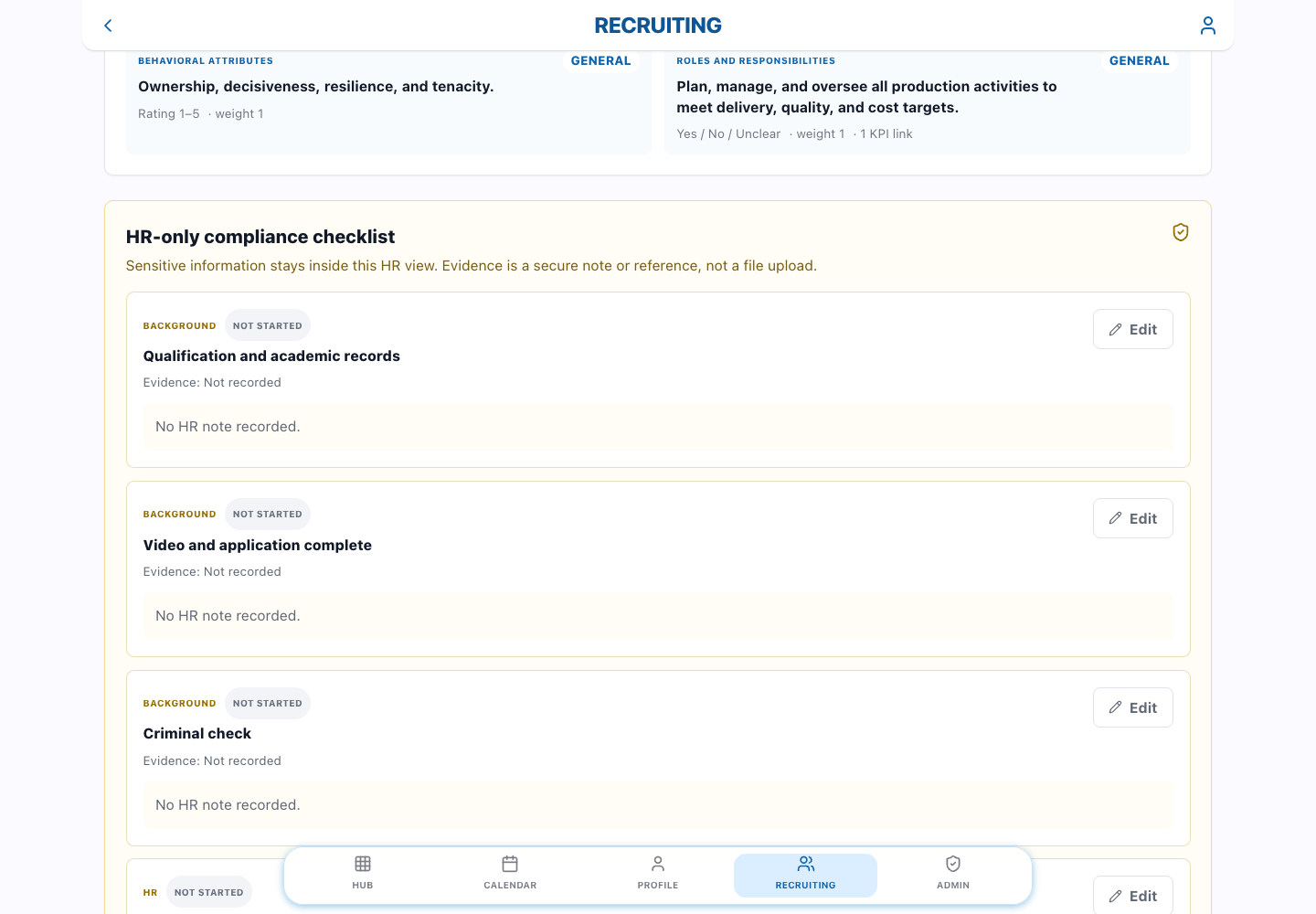
Onboarding: carry context into the first weeks
Onboarding is often treated as a collection of administrative tasks: create an account, send a document, schedule a meeting and tick a box. Those tasks matter, but they are only one part of a successful start.
A workflow designed around the organisation can carry forward the useful context from recruiting and make the first weeks more intentional. The new team member, manager and operations team may need different views of the same plan:
- the new team member needs clarity about responsibilities, priorities and who can help;
- the manager needs a way to agree expectations, check progress and remove blockers; and
- operations or HR needs visibility of required steps, access and compliance without exposing unnecessary private information.
That is a good example of where role-based access and a well-structured data model matter more than visual polish. The application should make the right information available to the right person at the right point in the process, while preserving a reliable record for the organisation.
Goals and outcomes: turn intentions into a plan
Goals become more useful when they describe an outcome rather than only an activity. “Hold weekly meetings” is an activity. “Give the team a dependable weekly view of delivery risks” describes a result that can be discussed, checked and improved.
The planning flow in this project was designed to make that distinction visible. It begins with the purpose of the work, then gives the team a place to describe why it matters and what success should look like. A guided sequence is helpful here because it prompts the conversation in a consistent order without pretending that every team has the same answer.
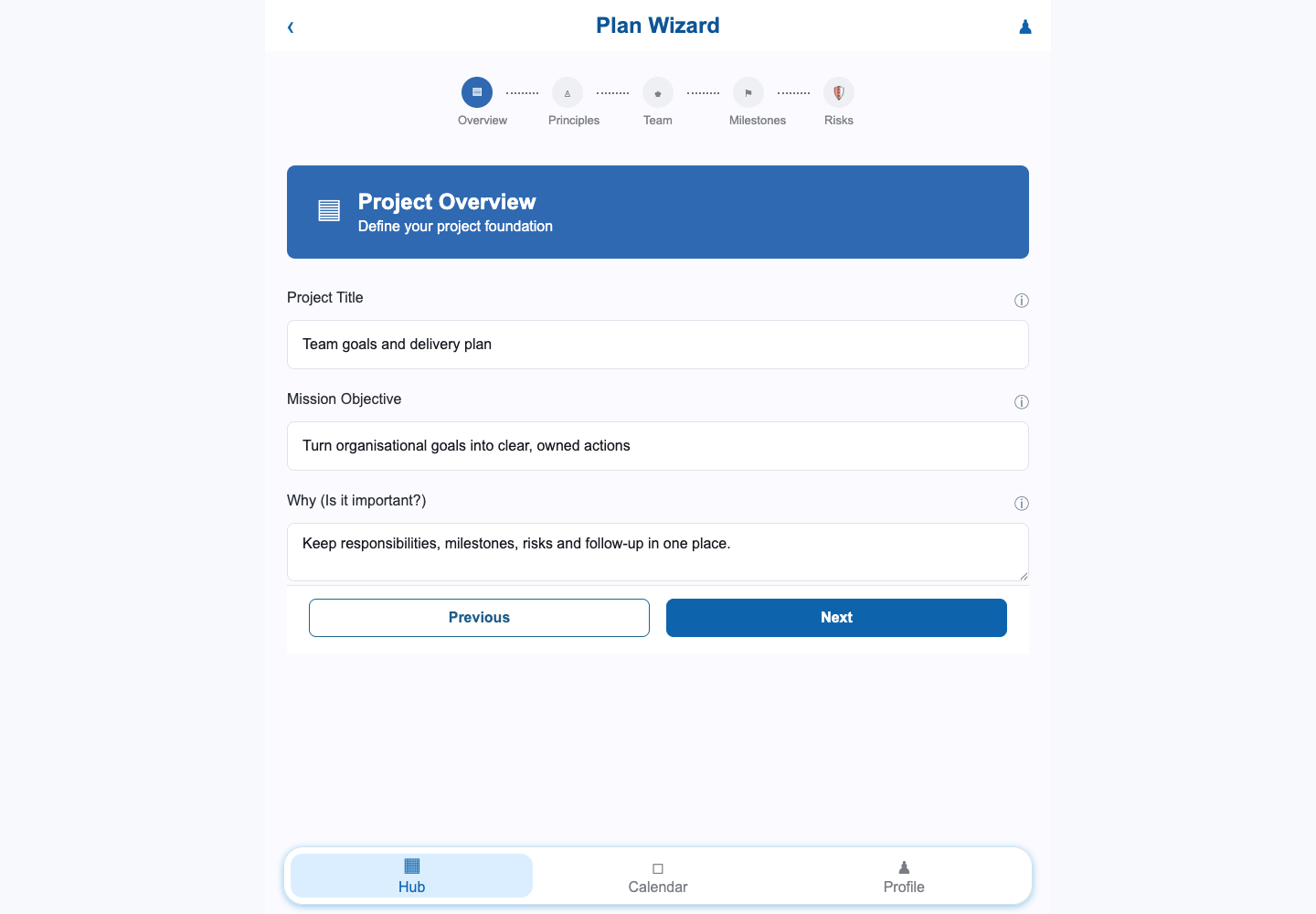
A structured plan can then become a shared reference point for onboarding, one-to-one conversations and later reviews. It does not need to become a bureaucratic document. The test is whether it helps people answer three questions quickly:
- What are we trying to achieve?
- Who is responsible for each important part?
- What evidence will tell us whether we are making progress?
Ownership and milestones: make the next action obvious
Many internal tools record that a goal exists but leave ownership implicit. That is where accountability becomes fragile. Everyone may support the goal, yet nobody knows who decides, who does the work, who should be consulted or who needs to be kept informed.
Making roles explicit is a small design decision with a large effect on the usefulness of the record. It also gives the application a better foundation for notifications, permissions, reporting and handover later.
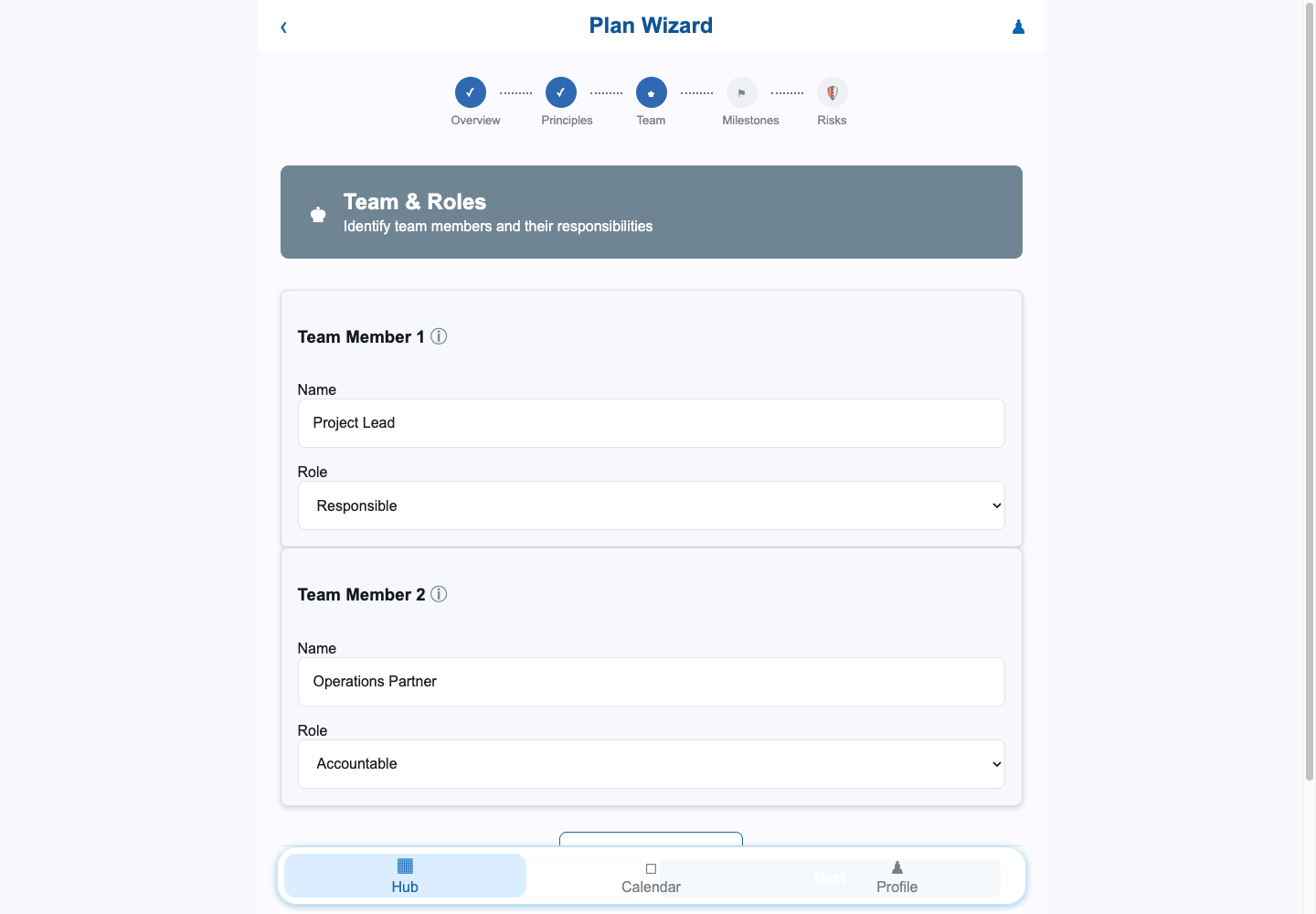
Milestones then turn the plan into a sequence of decisions and deliverables. A useful milestone answers more than “what are we doing?” It also records when it should happen, why it matters, how progress will be recognised and who owns the result.
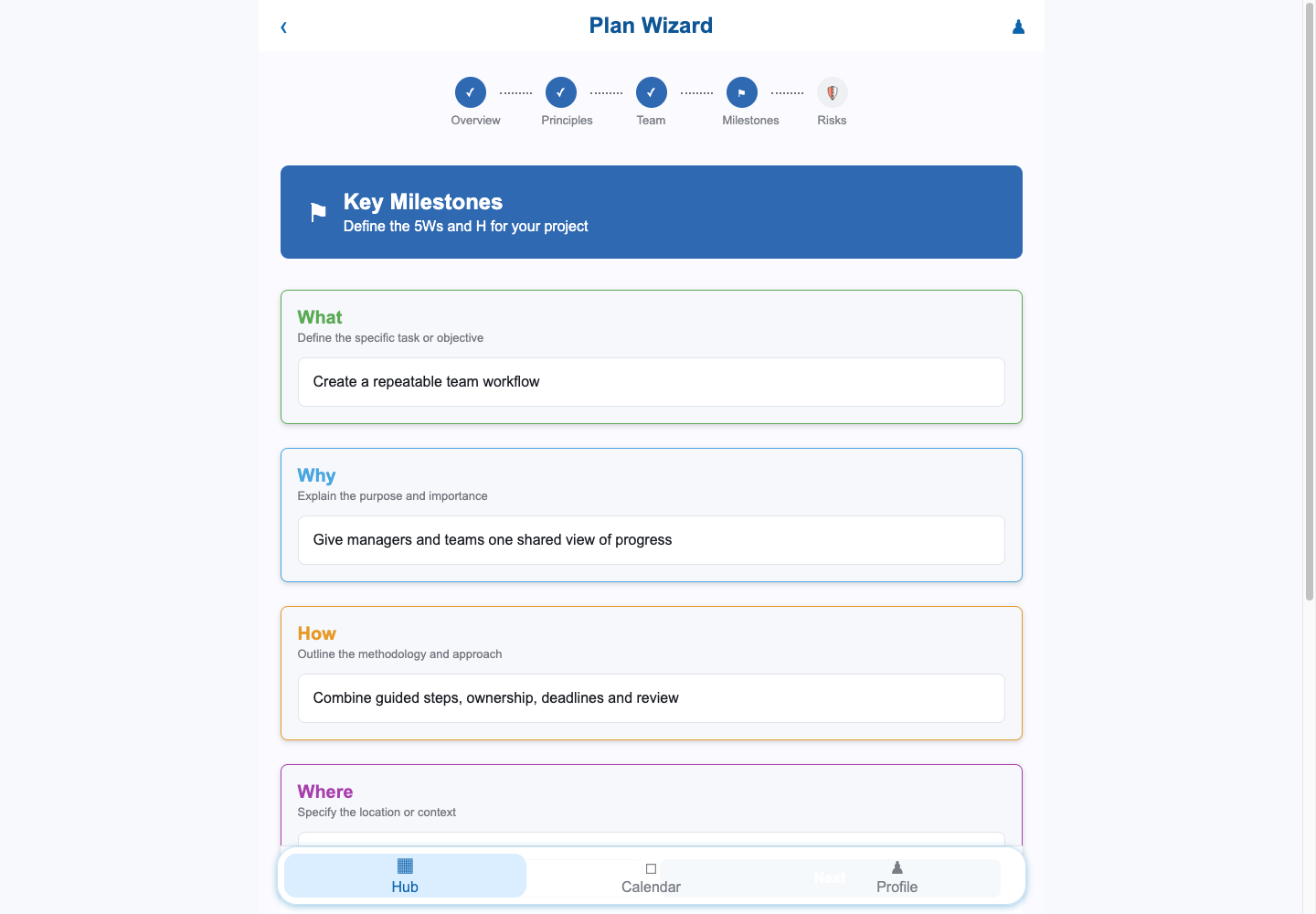
Risks belong in the same conversation. If a dependency or changing requirement could prevent a milestone from being completed, recording a mitigation and an owner is more useful than leaving the concern in meeting notes. The goal is not to predict everything. It is to make the known uncertainty discussable while there is still time to act.
Review before the plan disappears into storage
Review screens are easy to underestimate. They are where a collection of form fields becomes a shared agreement. Before submission, the team should be able to see the mission, roles, milestones and risks in one place, correct ambiguity and decide whether the plan is ready to guide real work.
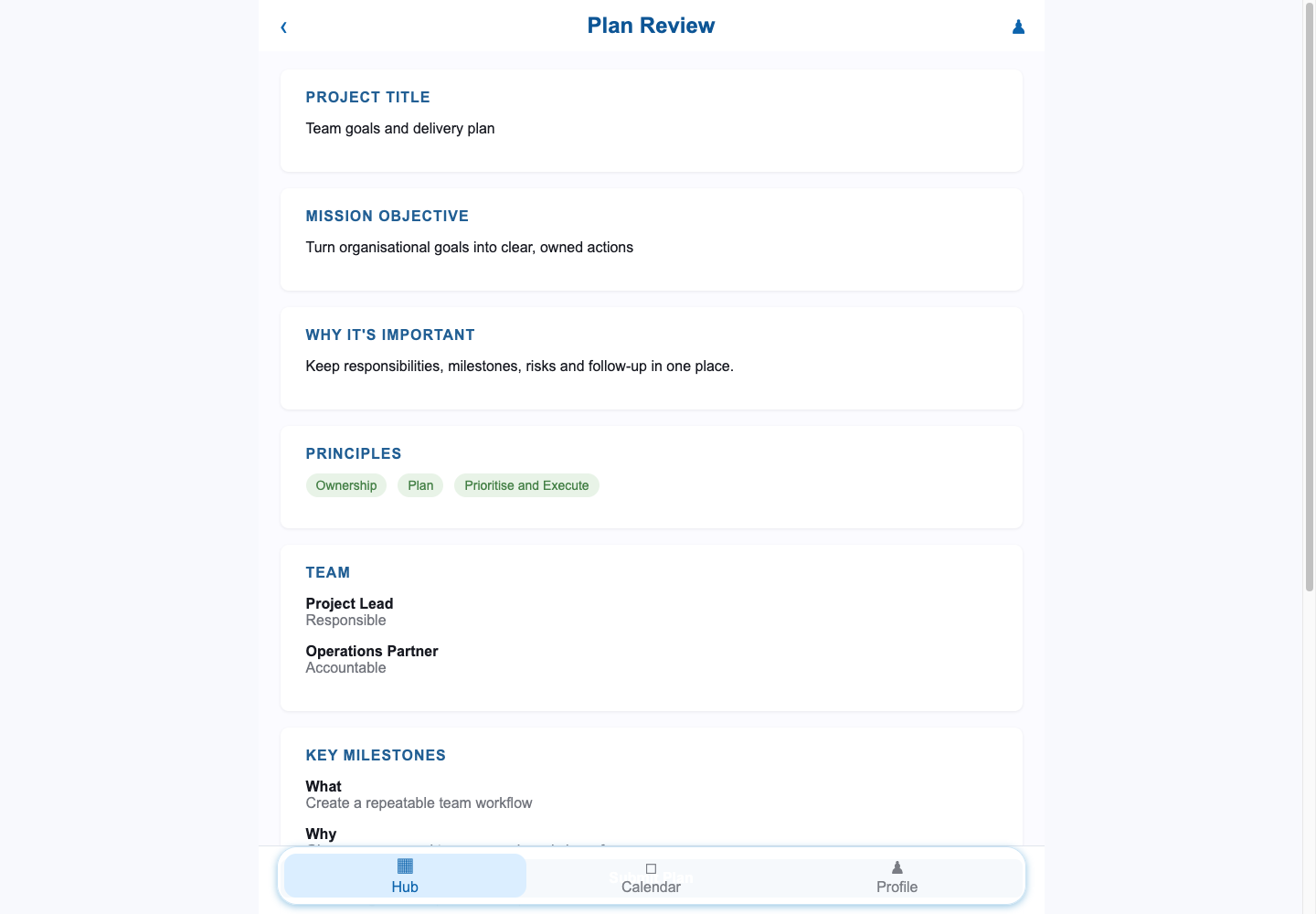
This is also a useful pattern for custom applications more broadly: guide users while information is being created, then give them a calm, readable summary before it is committed. It is a simple way to catch misunderstandings early and improve the quality of the data that future reports will depend on.
Debrief and follow-up: close the loop
A workflow that stops at “submitted” is only half complete. The organisation also needs a way to reflect on what happened, record what was learned and create the next action. Otherwise goals become historical documents rather than tools for improving decisions.
A debrief can ask what worked, where the plan fell short, what caused the gap and what should change next time. It can also capture a specific follow-up action, an owner and a check-in point. This makes the outcome of a conversation visible without requiring a manager to reconstruct it later from notes.
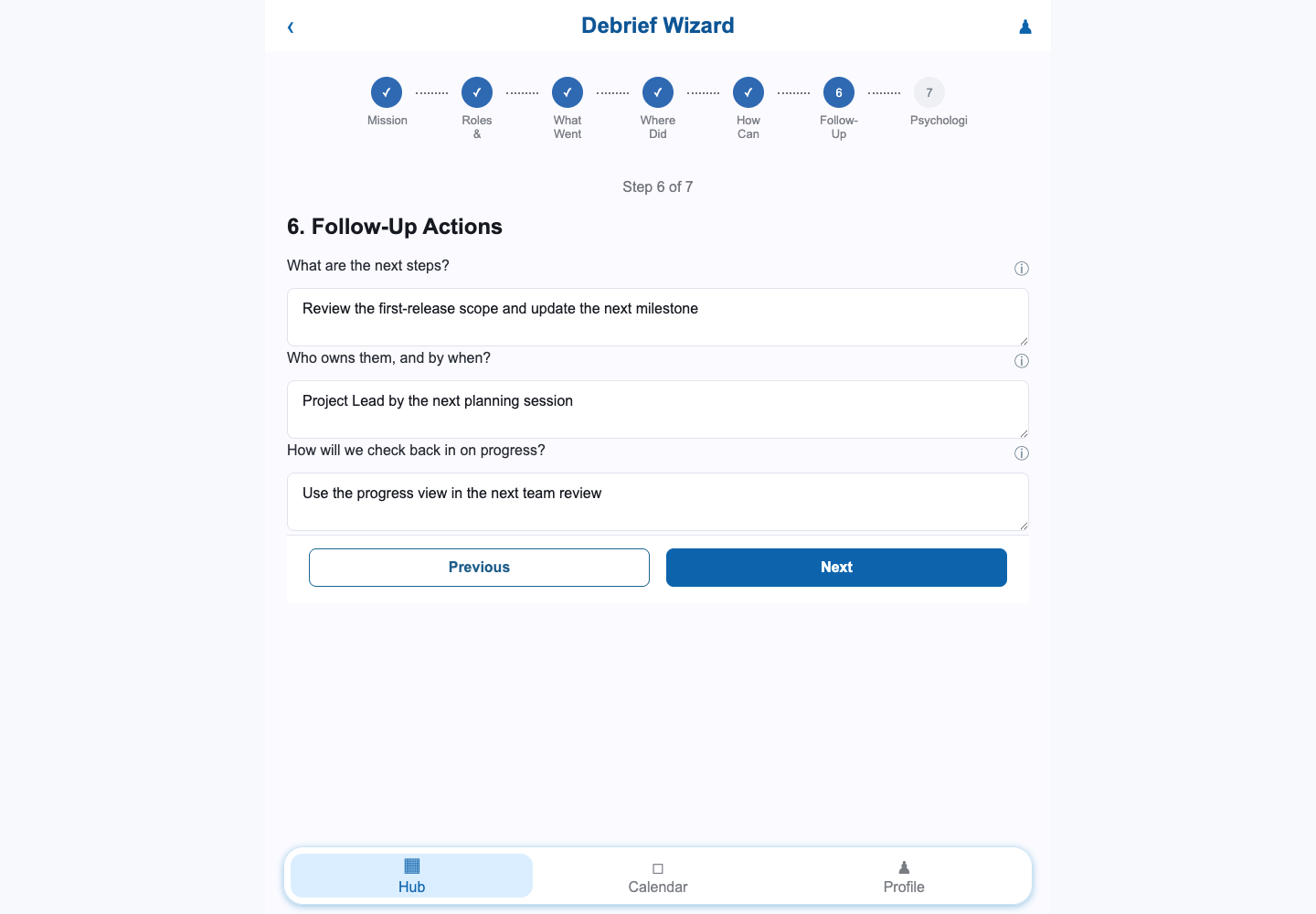
The same pattern can support onboarding reviews, project retrospectives, performance conversations or operational improvement. The labels may change, but the underlying need is stable: turn a discussion into a record that helps someone do the next useful thing.
Why custom software made sense for this example
Custom development is not automatically the best answer. An established applicant-tracking system, HR platform or performance product may already solve most of a team’s needs. Buying is usually sensible when the process is common, speed matters more than differentiation and the organisation does not want to own application operations.
In this example, a tailored approach was worth exploring because the important workflow crossed several categories:
- recruiting and assessment;
- onboarding and role context;
- goal setting and shared plans;
- responsibility, milestones and risk mitigation; and
- debriefs, outcomes and follow-up.
The value was in the connection between those activities, not in claiming to be a full replacement for every specialist product. A focused application could encode the organisation’s language and decisions while leaving room for standard integrations at the edges.
There was another practical advantage: the first release could be reviewed with the people who would use it. That creates a feedback loop before the business spends time polishing features nobody needs. It also makes adoption a product-design responsibility rather than a training problem left until launch.
The risks are real—and they are design requirements
The objections to custom internal software are reasonable. A project can be abandoned by its developer, fail to reach a useful release or become so unreliable that staff return to spreadsheets. Sensitive people information can also create privacy and security responsibilities that a business should not take lightly.
Those risks should change how the project is delivered, not simply end the conversation.
Prevent the single-developer trap
The client should have access to the source repository, hosting and deployment accounts, data exports and documentation. A second developer should be able to understand the architecture, set up the project and make a small change without relying on private knowledge. Standard platforms and open-source technologies can make that transfer easier, although they do not remove the need for clear documentation.
Make the first release small enough to finish
A first release should centre on one connected workflow, with written acceptance criteria and regular reviews. It is better to deliver a dependable path from role requirements to an agreed plan than to start ten unfinished modules. Scope can expand once the team has evidence about what is useful.
Protect trust through quality and support
Persistent defects are not only technical problems. They change behaviour. If users cannot trust a status, calculation or record, they create a parallel process. Important paths need testing, visible error handling, backups, monitoring and a support arrangement that remains clear after launch.
Treat people data as a responsibility
Recruiting and onboarding can involve sensitive information. Access should be based on role and need, not convenience. The project should define retention, audit, secrets, dependency updates, backups and recovery before data is placed in production. The NIST Secure Software Development Framework is a useful reference for integrating security practices throughout the software lifecycle, while the OWASP Application Security Verification Standard provides a practical catalogue of web application security requirements to consider and test.
The principle
Build the workflow you need, but deliver the ownership needed to keep it healthy.
What this example teaches us
- Connect the decisions, not every system. A useful internal product can focus on the handovers where context is being lost and integrate with specialist tools elsewhere.
- Make the data model part of the product. Clear relationships between people, roles, plans, milestones and outcomes are what make future reporting and migration possible.
- Use guided steps to improve conversations. A wizard is valuable when it helps a team think in a consistent order, not when it adds ceremony for its own sake.
- Make accountability visible. Owners, dates, risks and follow-up actions should be part of the record, not assumptions held by one manager.
- Design for change and handover from the first release. Documentation, source access, standard technology and small increments are not administrative extras. They are how a custom system remains an asset instead of becoming a dependency.
Common questions
Is custom internal workflow software the same as an HRIS?
Not necessarily. An HRIS is usually a broad system of record for people and employment information. A custom workflow tool may sit alongside it and handle a specific process—such as recruiting decisions, onboarding handovers, goal setting or outcome reviews—that the existing platform does not represent well.
Can a custom tool replace an applicant-tracking or onboarding platform?
It can, if the scope and operational responsibility are appropriate, but replacement is not always the best goal. A smaller workflow layer or integration may deliver the missing fit while retaining a mature system for payroll, compliance, job distribution or employee records.
Can we start with recruiting and add goals later?
Yes, provided the first release is scoped around a complete, useful workflow and the data model leaves a sensible path for the next stage. Decide early which information should be reusable so that onboarding or goal-setting work does not require an expensive rebuild.
How do we avoid being trapped by the original developer?
Agree ownership and access before delivery begins. Keep the source code, hosting and service accounts under the client’s control, document the architecture and deployment process, define the data export, list third-party dependencies and make handover part of the acceptance criteria.
How do we know whether custom software is worth exploring?
Look for a workflow that is important, repeated, difficult to represent in existing tools and already generating workarounds or lost context. Then compare buy, configure, integrate and build options against adoption, lifecycle cost, data ownership, risk and the capability available to support the result.
Start with the handover that keeps breaking
You do not need to begin with a vision for a giant all-in-one platform. Start with the point where information, responsibility or momentum is most often lost. Map the current process, involve the people who live with it, choose a first release that can be reviewed and decide who will own the system after launch.
That may lead to a configuration change in an existing product. It may lead to a small integration. Or it may show that a focused custom application is the clearest way to connect the work.
Planning a business system
Make the workflow clearer
before you make it bigger.
Future Ease Technologies helps businesses turn specialised processes into practical, maintainable software that their teams can actually use.
Discuss your projectReferences and further reading
- Government Digital Service and Central Digital and Data Office: Define your purchasing strategy — build, buy and combined approaches, lifecycle cost, open standards and ownership.
- GOV.UK Service Manual: Choose the right tools and technology — choosing tools, total cost of ownership and avoiding unnecessary lock-in.
- Fred D. Davis, “Perceived Usefulness, Perceived Ease of Use, and User Acceptance of Information Technology”, MIS Quarterly, 1989 — a foundation for thinking about perceived usefulness and ease of use.
- NIST SP 800-218: Secure Software Development Framework — secure practices across the software development lifecycle.
- OWASP Application Security Verification Standard — security requirements and verification guidance for web applications.